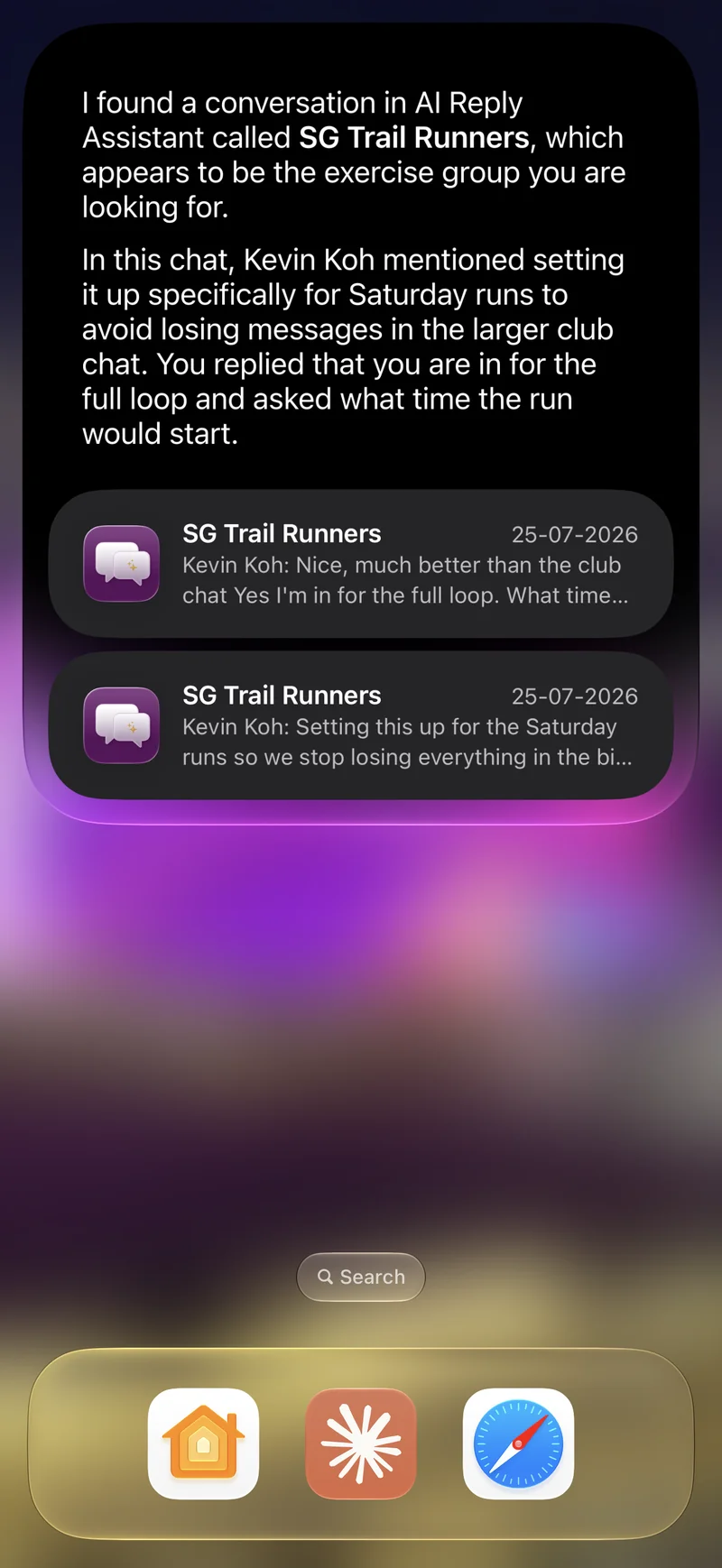
Personal context, beyond iMessage.
Apple Intelligence lets Siri draw on your personal context — finding what you are looking for across your apps, just by asking. On its own, that reaches Apple’s apps and iMessage. AI Reply Assistant extends it: your conversations across WhatsApp, Telegram, Instagram, and Messenger join the same on-device index, so search and Siri cover all your messaging, not one app’s worth of it.
Two ways to use it
The same on-device index powers both. Nothing to set up — it builds itself once your platforms are connected.
Booked the Sentosa place for Saturday — sending the address now
Alex Chen: is the Sentosa ferry booked or are we driving?
Where should we go? — Sentosa · East Coast · Bukit Timah
Matched a poll optionOne search, every platform — and it reaches inside polls, events, and shared locations.
Swipe down on the Home Screen, type a name or a phrase, and matching conversations and messages appear alongside your Apple results. Tap one to land in that chat.
Showing Search it yourself
What you can search
Your whole history is covered, with no cut-off date. Search reaches past plain message text and into the structured things people send — so you can find a poll by an option nobody remembers, or an event by the restaurant it was at.
| Searchable | What that covers |
|---|---|
| Message text | Everything written in a conversation, across all four platforms. |
| Media captions | The caption written on a photo, video, or document. |
| Polls | The question and every individual option — including options you did not vote for. |
| Events | Name, start and end time, venue, and the event description. |
| Checklists | The list title and every task on it. |
| Shared locations | Place name and street address, for both pins and named venues. |
| Link previews | The title, description, and URL of a shared link. |
| Documents | The file name of a shared document. |
| People and groups | Members by display name and by username, so a person surfaces the groups they are in. |
Pinned and starred items rank higher in results, and each result shows the contact or group avatar, who sent it, and a preview — so you can tell the right one apart at a glance.
Voice notes, photos, and translations
These become searchable once you have used the matching feature on that message. AI Reply Assistant does not transcribe, analyse, or translate everything you receive in the background — that would be a lot of work on your device for messages you may never revisit. Run it once on a message and it is searchable from then on.
| To make this searchable | Do this once |
|---|---|
| What was said in a voice message | Tap Transcribe on the voice message. |
| Text inside a photo | Tap Analyze on the image. |
| A message in its other language | Translate the message. |
What is never indexed
Some things are kept out of search entirely, whatever your settings say.
| Excluded | Scope |
|---|---|
| Locked chats | Whole conversation |
| Hidden chats | Whole conversation |
| Blocked contacts | Whole conversation |
| View-once messages | Individual message |
| Deleted messages | Individual message |
| System notices | Individual message |
Archived conversations are included — archiving tidies your inbox rather than hiding content. To keep a chat out of search entirely, lock or hide it. Everything is built and stored on device, and logging out of a platform removes everything it contributed.
Turning it on or off
iOS owns this switch, exactly as it does for Apple’s own Messages app — so there is no separate toggle buried inside AI Reply Assistant. Open Settings ▸ Apps ▸ AI Reply Assistant (or Settings ▸ Siri & Search) and set Show Content in Search. Turning it off stops your messages appearing in Spotlight and being used for personal context.
Checking or rebuilding the index
Inside the app, open Settings ▸ Chat and find the search index row. It shows how many messages and conversations have been indexed, whether a build is running, and when it last finished. If results look incomplete, use Restart Indexing to rebuild from scratch. The index also repairs itself — it rebuilds after a device restore and catches up each time you reopen the app.
What Siri can and cannot do yet
Siri can find and answer from your conversations today — that is what the index is for. Having Siri send a message on your behalf depends on Apple’s own support for acting inside third-party apps, which is still expanding. For dependable voice sending right now, build a shortcut and run it by name — “Hey Siri, Morning digest”.
22 actions to send, create, find, and open — each one runnable by voice inside a shortcut.
Search and Siri — common questions
Yes, in two ways.
Run your automations by voice. Every one of the 22 actions is available in Shortcuts, and any shortcut you build can be run by name — "Hey Siri, Morning digest".
Answer from your conversations. AI Reply Assistant contributes your chats to the on-device index Siri and Apple Intelligence use for personal context, so Siri can draw on them when you ask about your messages.
Sending a message purely by voice depends on Siri’s own support for acting inside third-party apps, which Apple is still expanding — for reliable voice sending today, wrap the send in a shortcut and run that by name.
All four — WhatsApp, Telegram, Instagram, and Messenger — in a single search, alongside your Apple results. Swipe down on the Home Screen, type a name or a phrase, and matching conversations and messages appear together. Tap one to jump straight to that chat.
This is the part Apple’s own Messages app cannot do: it searches iMessage and SMS only. AI Reply Assistant puts all four of your other messaging platforms into the same place.
Your entire history. The first time the index is built it covers every message the app has, with no cut-off — then it keeps itself up to date as new messages arrive, and catches up on anything it missed while the app was closed.
Yes — this is where search reaches furthest:
- Polls — the question and every individual option
- Events — name, start and end time, venue, and details
- Checklists — the title and every task on the list
- Shared locations — place name and address
- Link previews — the title, description, and URL of a shared link
- Documents — the file name
- Media captions — the caption written on a photo or video
So you can find a poll by an option nobody remembers voting for, or an event by the restaurant it was at, without recalling a single word of the surrounding conversation.
Yes. Group members are indexed by display name and by username, so searching a person’s name or their @handle surfaces the groups they are in — not just chats whose title happens to match. Where a contact is linked to your address book, the entry is bound to that contact too, which is what lets Siri resolve a spoken name to the right person.
Only after you transcribe it. Open the voice message and tap Transcribe — from that point on, its text is searchable in Spotlight like any other message.
AI Reply Assistant does not transcribe every voice note automatically, because transcription is real work on your device and most voice notes are never revisited. So a voice message you have not transcribed yet will not appear in search results.
Once you have analysed that photo. Tap Analyze on an image and the recognised text — an address in a screenshot, a code on a receipt — becomes searchable from then on. As with transcription, this runs when you ask for it rather than automatically on every image you receive.
Once you translate a message, both the original and the translation are searchable — so you can find it by whichever language comes to mind first. Messages you have not translated remain searchable in their original language.
Whole conversations are excluded when they are locked, hidden, or blocked. Individual messages are excluded when they are view-once, deleted, or system messages (join/leave notices and similar).
Archived conversations *are* included — archiving is about tidying your inbox, not hiding content. If you want a chat kept out of search entirely, lock or hide it.
If anything goes wrong while working out what is eligible, the app indexes nothing rather than risk indexing something sensitive.
It is entirely on device. Your conversations are never sent anywhere to be indexed. iOS keeps your search queries private too: apps never see what you type into Spotlight or Siri. The index is built from resolved contact and chat names rather than raw phone numbers or IDs. If you log out of a platform, everything it contributed is removed from the index immediately.
iOS controls this for you — the same way it does for the built-in Messages app — so there is no separate switch buried inside AI Reply Assistant. Open Settings, find AI Reply Assistant under Apps (or Settings ▸ Siri & Search), and toggle “Show Content in Search”, “Show App in Search”, and “Learn from this App”. Turning off “Show Content in Search” stops your messages from appearing in Spotlight and from being used for personal context.
Open Settings ▸ Chat inside AI Reply Assistant and find the search index row. It shows how many messages and conversations have been indexed, whether a build is currently running, and when the index was last updated. If something looks wrong, use Restart Indexing to rebuild it from scratch.
The index also repairs itself: it rebuilds automatically after a device restore, and catches up whenever you reopen the app.
Your personal AI assistant for messaging.
Download AI Reply Assistant on iOS and try it free.